> For the complete documentation index, see [llms.txt](https://guide.ci.me/llms.txt). Markdown versions of documentation pages are available by appending `.md` to page URLs; this page is available as [Markdown](https://guide.ci.me/en/viewer-guide/donation-guide/video-donations.md).
# Video Donations
Play a YouTube video or CI.ME clip on stream with a chosen start and end point. Cost equals segment seconds times the streamer's per-second Beam rate.
***
## **Overview**
With CI.ME's **Video Donation** feature, viewers can support streamers while sharing videos live on stream.
Video Donations let you spend Beam to play a video and send a message during a broadcast, creating fun and interactive moments for both the streamer and the community.
## **How to Send a Video Donation**
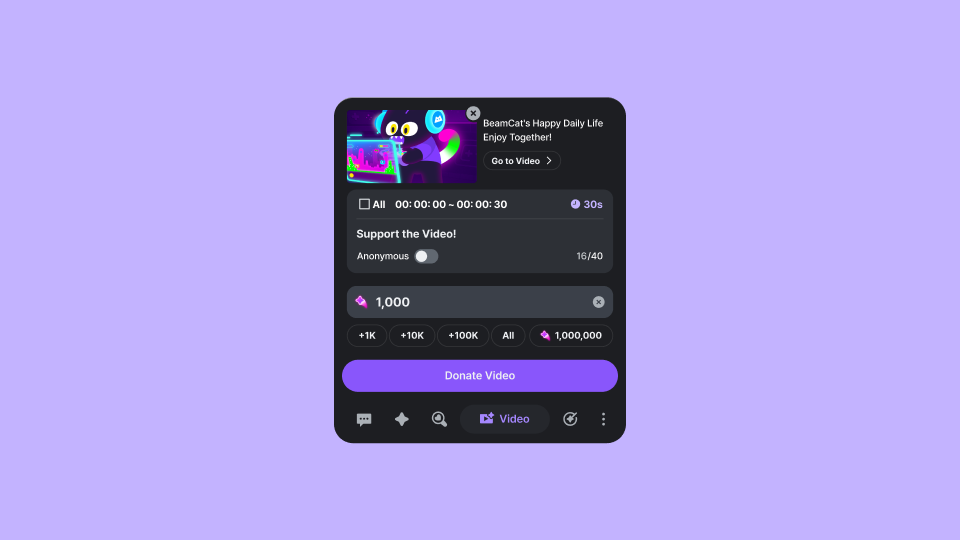
1. Click the Video Donation button below the chat.
2. Paste a YouTube video or CI.ME Clip link.
3. Set the start and end times for the portion you'd like to play.
4. Add a message.
5. Once your donation is submitted, the video will be added to the queue and played on stream. If the streamer chooses to skip the video, a notification will be shown indicating that the video was skipped.
## **Video Playback Range**
When sending a Video Donation, you can choose exactly which part of a video will be played on stream.
* Set a custom start time
* Set a custom end time
## **How Donation Costs Are Calculated**
The minimum amount of Beam required increases based on the length of the video segment being played.
* Required Beam **= Video Length (seconds) × Beam per Second**
The Beam-per-second rate can be customized by each streamer.
## **Previously Used Videos**
When sending a Video Donation, you can view a **list of videos you've donated in the past**.
* Reuse videos you've previously donated
* Quickly access and resend your favorite clips
## **Anonymous Video Donations**
Video Donations can also be **sent anonymously**.
When Anonymous Donation is enabled:
* Your username will not be displayed in chat
* Only the video and message will be shown on stream and in chat
#### **Frequently Asked Questions**
Q. What videos can I donate?
You can currently send Video Donations using YouTube videos or CI.ME Clips.
Q. Do I have to play the entire video?
No. When sending a Video Donation, you can choose exactly which portion of the video will be played.
Q. How is the cost of a Video Donation calculated?
The cost of a Video Donation is automatically calculated based on the length of the video segment being played.
The longer the video, the more Beam is required. The Beam-per-second rate is set by the streamer.
Q. Can I use a video I've donated before?
Yes. Videos you've previously donated are saved in your donation history and can be selected again for future Video Donations.
Q. Can I send a Video Donation anonymously?
Yes. If you choose Anonymous Donation, your username will not be displayed when the Video Donation is shown on stream.
Only the video and your message will be displayed, allowing you to support the streamer while remaining anonymous.
*Update: 7/06/26*
{% embed url="" %}